August 12, 2026
Cloud Application Modernization: A 2026 Guide for IT Leaders

A modernization program can hit every milestone in the migration plan and still fail. The app moves to the cloud, the servers get decommissioned, the project closes out green. Six months later, the same team is paying more than they did on-premises, the "modernized" application still can't scale past a predictable Tuesday traffic spike, and nobody can explain why the effort that was supposed to fix things just relocated them.
That gap between "we migrated" and "we modernized" is where most cloud application modernization programs actually live or die. This guide covers what cloud application modernization means, how it differs from cloud migration, the strategies (the "Rs") you'll choose between, how to pick a cloud platform, how to build a roadmap, and the decisions that determine whether the whole effort compounds into something better or just moves the same problems to a more expensive zip code.
What Is Cloud Application Modernization?
Cloud application modernization is the process of updating an application's architecture, code, or infrastructure specifically to take advantage of cloud-native capabilities, not merely to relocate it to a cloud provider's data center. It covers everything from adjusting how an app handles state so it can scale horizontally, to breaking a monolith into services that deploy independently, to replacing self-managed infrastructure with managed cloud services.
The distinction matters because "moving to the cloud" and "modernizing for the cloud" are not the same project, even though they get bundled together constantly. An application can run entirely on AWS, Azure, or Google Cloud and still be architecturally identical to the on-premises version it replaced: same monolith, same scaling ceiling, same deployment risk, just billed monthly instead of depreciated over five years. The real target of cloud application modernization is a different way of building, not just a different data center. The National Institute of Standards and Technology's foundational definition of cloud computing centers on on-demand, elastically provisioned resources with minimal management overhead. Modernization is the work of actually architecting an application to consume those elastic properties, instead of just sitting on top of them.
Cloud Modernization vs. Cloud Migration vs. Application Modernization: What's the Difference?
These three terms get used interchangeably in vendor marketing, and that's part of why modernization programs go sideways. Each one describes a different scope of work.
Cloud migration is the act of moving a workload from one environment to a cloud provider, with the emphasis on relocation rather than transformation. A straightforward lift-and-shift, where a VM image gets copied to a cloud instance with minimal changes, is a migration. It's often fast and low-risk, but it inherits every architectural limitation the application already had.
Application modernization is the broader parent category: updating outdated applications, architectures, or infrastructure to reduce technical debt and better serve current business needs, regardless of destination. You can modernize an application and keep it entirely on-premises (refactoring a monolith into services that still run in your own data center is modernization without cloud migration at all). Our guide on the broader application modernization process covers that full scope, including on-prem and hybrid paths.
Cloud modernization is the intersection: modernization work where the destination and the architectural target are both cloud-native. It's not just "did the workload move," it's "does the workload now behave like a cloud-native system," with elastic scaling, managed dependencies, and infrastructure that can be provisioned and torn down on demand rather than racked and depreciated. A rehosted VM in AWS has migrated. An application refactored into containers with autoscaling, and a managed database has modernized for the cloud. Most real programs need to make that distinction explicit early, because a team that thinks it's doing cloud modernization but is actually just executing a migration will hit a very different (and much lower) ceiling on the benefits it can claim afterward.
The Cloud Modernization Strategies (The 5 Rs and Beyond)
Ask three different sources for "the Rs of cloud modernization," and you'll get three different lists, and that inconsistency itself is worth understanding before you pick a strategy.
Gartner's original framing, published in 2010, named five approaches: Rehost, Refactor, Revise, Rebuild, and Replace. As Cloudflare's explainer on application modernization documents, that's the framework most industry writing traces back to. The primary Gartner research itself sits behind an analyst paywall. AWS has since expanded that into what it now calls the "7 Rs": Retire, Retain, Rehost, Relocate, Repurchase, Replatform, and Refactor or re-architect. Google Cloud's own migration guidance uses yet another six-item list: Rehost, Replatform, Refactor, Re-architect, Rebuild, and Repurchase. It notably treats "Refactor" and "Re-architect" as two separate strategies rather than one. None of these three frameworks match term for term.
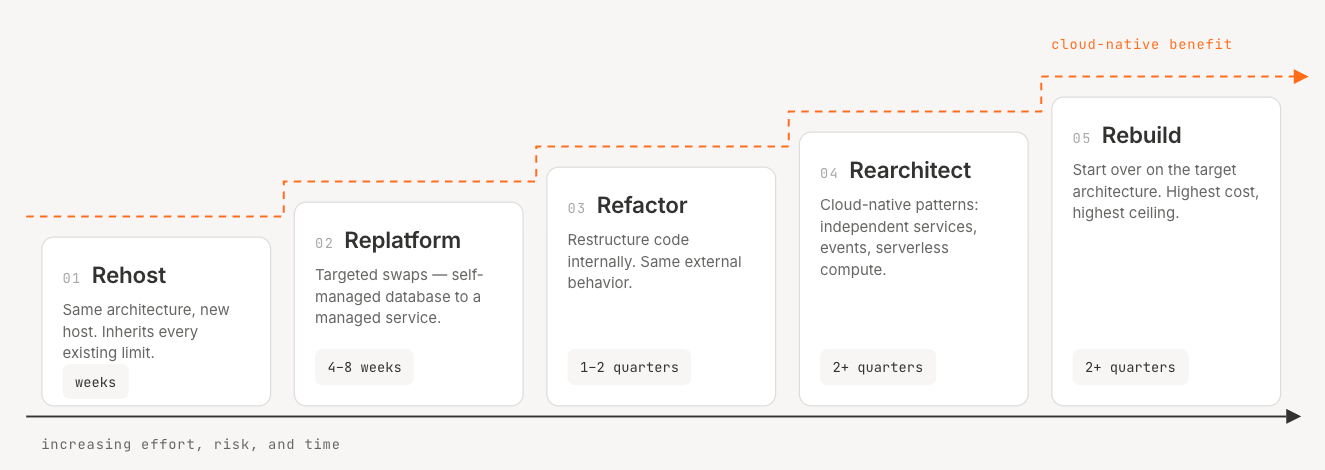
That fragmentation isn't a trivia point. It means "we're using the 5 Rs" tells you almost nothing about what a vendor or consultant actually plans to do to your application until you ask which five (or six, or seven) they mean. For practical purposes, most modernization programs converge on the same handful of real strategic choices, regardless of whose naming convention they borrow:
Rehost (Lift and Shift)
Moving the application to cloud infrastructure with minimal code changes; same architecture, new host. Fastest path to getting out of a data center, but it inherits every scaling and maintainability limitation the app already had. Useful as a first step in a longer modernization sequence, or when the business driver is a lease expiration or hardware end-of-life, not architectural improvement.
Refactor and Replatform
Refactoring restructures code internally (breaking apart tightly coupled logic, improving modularity) without changing what the application does externally. Replatforming makes targeted infrastructure swaps, like moving a self-managed database to a managed cloud service, without a full rewrite. Both sit in the middle of the effort-versus-benefit curve: real operational gains, without the cost or risk of rebuilding from scratch.
Rearchitect and Rebuild
Rearchitecting redesigns the application to use cloud-native patterns like microservices, event-driven communication, or serverless compute. Rebuilding goes further and starts over entirely. Both are the highest-effort, highest-reward strategies, appropriate when an application is strategically important enough to justify the investment but its current architecture actively constrains the business.
The trade-offs across all the common strategies look like this:
Treat those timelines as typical orders of magnitude rather than fixed commitments. Actual duration depends heavily on application size, team capability, regulatory requirements, data migration complexity, testing rigor, and release process.
The mistake most portfolios make isn't picking the wrong strategy for one application. It's picking one strategy for the whole portfolio, either rehosting everything (and modernizing nothing) or rearchitecting everything (and running out of budget and patience before the program finishes).
Why Move Modernization to the Cloud? Key Benefits
The case for cloud-directed modernization over on-premises modernization or a simple lift-and-shift comes down to a few concrete advantages that only materialize when the architecture actually changes, not just the hosting.
Cost efficiency is the most commonly cited benefit, but it depends heavily on execution and the specific cloud provider. An AWS-commissioned Enterprise Strategy Group study modeled organizations reducing compute, networking, and storage costs by up to 66% over three years by moving from on-premises infrastructure to AWS. Worth noting: that figure comes from vendor-commissioned research modeling a specific scenario, not an independent industry-wide benchmark. The savings also assume the workload is actually re-architected to take advantage of autoscaling and managed services, rather than just rehosted at cloud list prices, and realizing them in practice further depends on right-sizing instances, autoscaling policies, reserved or savings-plan pricing, storage and network costs, software licensing terms, and how operationally mature the team running the environment actually is. A rehosted, over-provisioned instance running 24/7 can easily cost more than the on-premises box it replaced.
Scalability is the benefit that's hardest to fake with a migration alone. Cloud-native applications built with autoscaling, load balancing, and managed compute can absorb demand spikes that would have required months of hardware procurement in a data center. This only works, though, if the application's architecture actually supports horizontal scaling. Rehosting a stateful monolith onto a bigger cloud instance gives you a bigger single point of failure, not elasticity.
Security posture can improve under the cloud provider's shared responsibility model, since providers take on physical infrastructure security and part of the patching burden for managed services. That model is a split, though, not a handoff: the customer still owns identity and access management, data protection, configuration, patching at its own layer, application security, logging, and the evidence needed to prove compliance. Moving to the cloud doesn't automatically make an application more secure; it changes which risks the provider absorbs and which ones the team still has to manage itself.
Disaster recovery can improve, since cloud-native applications can be designed for multi-region failover in a way that's prohibitively expensive to replicate with owned hardware. Multi-region failover isn't automatically cheap or simple, though: it adds cost, introduces data-consistency tradeoffs, and takes real testing and operational discipline to work when it's actually needed.
Reduced technical debt is probably the least discussed benefit here, and often the most consequential. Every year an application stays on an unsupported runtime or an undocumented on-premises stack, the cost of eventually modernizing it grows, along with the security exposure. Cloud modernization, done with an actual architectural upgrade rather than a rehost, is one of the few points where a team can pay down that debt instead of just deferring it again.
Azure vs. AWS vs. Google Cloud: Choosing a Platform for Modernization
Choosing a cloud platform for modernization is rarely a clean technical decision. It's usually some combination of existing vendor relationships, team familiarity, compliance requirements, and which provider's managed services best fit the applications actually being modernized.
Microsoft Azure tends to be the default for enterprises already standardized on Microsoft's ecosystem, Active Directory, .NET, or Windows Server workloads, and it's a common landing zone for regulated industries doing an on-premises-to-cloud move because of its enterprise compliance tooling and the Cloud Adoption Framework that Microsoft publishes for structuring the migration itself.
Amazon Web Services is often chosen for the breadth and maturity of its managed-service catalog, particularly by teams doing significant rearchitecture rather than a straightforward lift-and-shift.
Google Cloud differentiates on data and AI/ML tooling and Kubernetes-native operations (Kubernetes originated at Google and is now governed by the Cloud Native Computing Foundation), and tends to fit teams already building containerized, cloud-native workloads rather than legacy lift-and-shift candidates.
None of the three is universally correct, and the relevant evaluation criteria are governance and compliance fit, compatibility with the existing technology stack, and total cost of ownership under realistic (not best-case) usage patterns, not which vendor has the best marketing page. Multicloud and hybrid cloud strategies are also increasingly common for enterprises with regulatory constraints, M&A-driven technology sprawl, or workloads that perform better split across providers. Multicloud adds real operational complexity of its own: more identity systems, more networking patterns, more tooling to keep in sync. It's worth choosing deliberately, for one of those concrete reasons, rather than defaulting to it as a general hedge against vendor lock-in.
What tends to get underweighted in the vendor-versus-vendor decision is that the harder problem is usually sequencing, not platform: which applications move, in what order, using which strategy. That's a decision that depends on the actual state of your architecture: what depends on what, what's business-critical versus merely old, and what the real migration cost looks like once dependencies are accounted for. It's exactly the kind of multi-variable trade-off that's difficult to reason through from a spreadsheet, which is why some teams use an AI reasoning agent like Catio's Archie to work through platform and sequencing trade-offs against their actual architecture graph rather than a generic vendor comparison chart. If your infrastructure runs on AWS specifically, modeling that infrastructure accurately before committing to a modernization sequence is its own prerequisite step, since architecture diagrams built from logical assumptions routinely misrepresent how workloads are actually deployed across availability zones.
How to Build a Cloud Application Modernization Roadmap
A roadmap is what turns a strategy decision into an executable plan with a defensible order of operations. At a high level, most credible cloud modernization roadmaps move through the same arc:
1. Assess the application portfolio. Build a real inventory: what exists, what it depends on, what it costs to run, and how it's actually used, not what the CMDB says.
2. Establish a baseline before anything moves. Record what the current state actually costs and how it performs: cost, latency, availability, deployment frequency, incident rate, operational toil, and technical debt. Without that baseline, no one can prove later whether the modernization effort actually worked.
3. Prioritize by business value and technical debt. Score each application on how much it matters and how much it's hurting. High-value, high-debt applications get the modernization budget first.
4. Map dependencies before committing to a sequence. The applications that look simple to move are frequently the ones with the most undocumented downstream consumers.
5. Plan the phased rollout. Sequence the work in waves that each ship independently, rather than one big-bang cutover.
6. Execute and operate. Move applications through their chosen strategy, then hold the new baseline: monitoring, cost visibility, and governance so the modernized system doesn't quietly re-accumulate the same debt.
This is deliberately a summary, not the full playbook. Our modernization roadmap guide walks through each phase in depth, including how to build the prioritization scoring and sequence the waves. The part worth emphasizing here: the roadmap phase is where a cloud-specific program diverges most from a generic modernization roadmap, because platform selection and cloud-native target architecture have to be locked in before the sequencing makes sense. You can't sequence "which app moves first" until you know whether it's moving to a rehosted VM or a rearchitected microservice.
Common Challenges in Cloud Application Modernization
Most cloud modernization programs run into some version of the same obstacles. The programs that succeed treat these as planning inputs rather than surprises discovered mid-execution.
Technical and Data Challenges
Vendor lock-in is the most cloud-specific risk on this list. The deeper an application is refactored to use a provider's proprietary managed services, the harder and more expensive it becomes to leave that provider later. This is a legitimate trade-off, not just a defensive marketing point: proprietary managed services often deliver real operational benefits, and the right answer isn't always "avoid lock-in at all costs"; it's understanding what you're trading away before you commit.
Data governance and residency get harder in the cloud, not easier, especially for regulated industries. Moving data across regions or provider boundaries can trigger compliance obligations that didn't apply to an on-premises system, and legacy compatibility issues (an old data model that doesn't map cleanly onto a modern managed database) routinely surface only after migration is underway.
Organizational and Governance Challenges
Service disruption risk during cutover is real, and the fear of it is a common reason modernization programs stall in planning indefinitely. Phased rollout with clear rollback plans, rather than a single flip-the-switch cutover, is what makes this risk manageable rather than existential.
Change management is underestimated constantly. Engineers who understand the legacy system deeply are often the same people whose workflows change the most once the modernized architecture is live, and that friction is organizational, not technical. Programs that treat this as a communication and training problem from the start tend to hold their timelines better than ones that only plan the technical cutover.
Choosing between the modernization tools and platforms available for these problems (cloud-provider-native tooling versus independent, cloud-agnostic solutions) is its own evaluation. Our comparison of modernization solutions covers that landscape in more depth if the tooling decision is the current bottleneck.
How Catio Supports Cloud Application Modernization Decisions
We aren't a migration tool. We don't move workloads, provision cloud infrastructure, or execute a cutover. What we do is sit above that execution layer as a decision layer that helps determine which applications get modernized, in what order, with which strategy, and onto which cloud platform, before any migration tooling runs.
That distinction matters because most of the tooling in the cloud modernization market solves the mechanics of moving an application. Far less of it helps answer the harder question upstream: given a real, current picture of your architecture, which of these hundred applications should actually move first, and why?
We approach that gap through a few specific mechanisms:
Archie, our conversational reasoning agent, is built to work through modernization trade-offs the way a principal architect would, grounded in the live architecture model we build from an organization's code, cloud config, and observability data, rather than a static spreadsheet or a generic framework. Ask it which legacy application to rearchitect first versus which to simply rehost, and it reasons through the answer using the actual dependency graph, not a rule of thumb.
GraphQA lets architects query the live architecture graph directly, in natural language, to understand what a given application actually depends on before committing to a modernization sequence. This addresses the dependency-mapping problem directly. One of the most common reasons modernization estimates blow up mid-project is a dependency nobody mapped beforehand, and GraphQA is built to surface those connections from the architecture data we've actually ingested rather than from a diagram someone drew a year ago.
The Recommendations module surfaces specific modernization and cloud-platform recommendations with the trade-offs, risk, and ROI already attached, framed as Blueprints, our structured artifact for describing a change from current state to target state along with the reasoning behind it. Once a modernization decision moves from "which application" to "how do we actually build this," that decision can be captured as a Design, our blueprint type for a user-committed change with a defined target architecture and implementation plan.
MCP support connects that decision layer to whatever execution tooling a team already uses. Once a modernization sequence is decided, the resulting specs can flow via MCP into coding tools like Claude Code and Cursor, or into VS Code through a compatible MCP-enabled extension, so the architecture decision and the code that executes it stay connected instead of drifting apart the way a decision documented in a slide deck usually does. What that connection can actually do in practice still depends on the specific MCP server, client, and permissions involved on each end.
Cloud providers and migration tools are good at moving and rebuilding applications once you know what to move and how. We're built for the step before that, the one many modernization failures actually trace back to. Teams evaluating our broader platform for this use case are usually the ones who've already run one modernization project that shipped on time but delivered less value than expected, and are trying to figure out why.
Conclusion
Cloud application modernization succeeds or fails on the decisions made before a single workload moves: which applications actually need to change, which strategy fits each one, and which cloud platform makes sense given the real constraints, not the vendor pitch. Migration execution matters, but it's rarely where these programs actually go wrong. They go wrong upstream, in the sequencing and platform decisions nobody built a real process around.
If your team is heading into a modernization effort and the harder question is still "which applications, in what order," that's the layer our Recommendations and Archie are built to support: reasoning through the trade-offs against your actual architecture instead of a generic framework. Book a demo to see how it works against your own stack.
Frequently Asked Questions
What is cloud application modernization? It's the process of updating an application's architecture, code, or infrastructure to take advantage of cloud-native capabilities, such as elastic scaling and managed services, rather than simply moving it to a cloud provider's infrastructure unchanged. The term is used interchangeably with "cloud modernization" in most industry writing, including in this guide.
What are the 7 R's of application modernization? The "7 Rs" is AWS's current official framework for migration strategy: Retire, Retain, Rehost, Relocate, Repurchase, Replatform, and Refactor or re-architect. It builds on Gartner's original 2010 framework, which named five strategies, but the difference is more than adding Retire and Retain: AWS also names Relocate, Repurchase, and Replatform as distinct strategies of their own and folds Refactor and re-architect into a single combined category.
What is cloud modernization? Cloud modernization is the process of updating an application's architecture, code, or infrastructure specifically to take advantage of cloud-native capabilities like elastic scaling and managed services, rather than simply relocating the application to a cloud provider's infrastructure unchanged.
What are the 5 R's of modernization? The original "5 Rs," as defined by Gartner in 2010, are Rehost, Refactor, Revise, Rebuild, and Replace. Other frameworks (AWS's 7 Rs, Google Cloud's 6-item list) have since built on this with different terms and additional categories, which is why you'll see the count and the names vary depending on the source.
What is application modernization? Application modernization is the broader practice of updating outdated applications, architecture, or infrastructure to reduce technical debt and better align with current business needs. It includes cloud-directed modernization as one path, alongside on-premises and hybrid modernization efforts, covered in more depth earlier in this guide.
Share this Post