July 27, 2026
We Don't Replace Your Coding IDE. We Give It a Clue.

Victor Kazakov
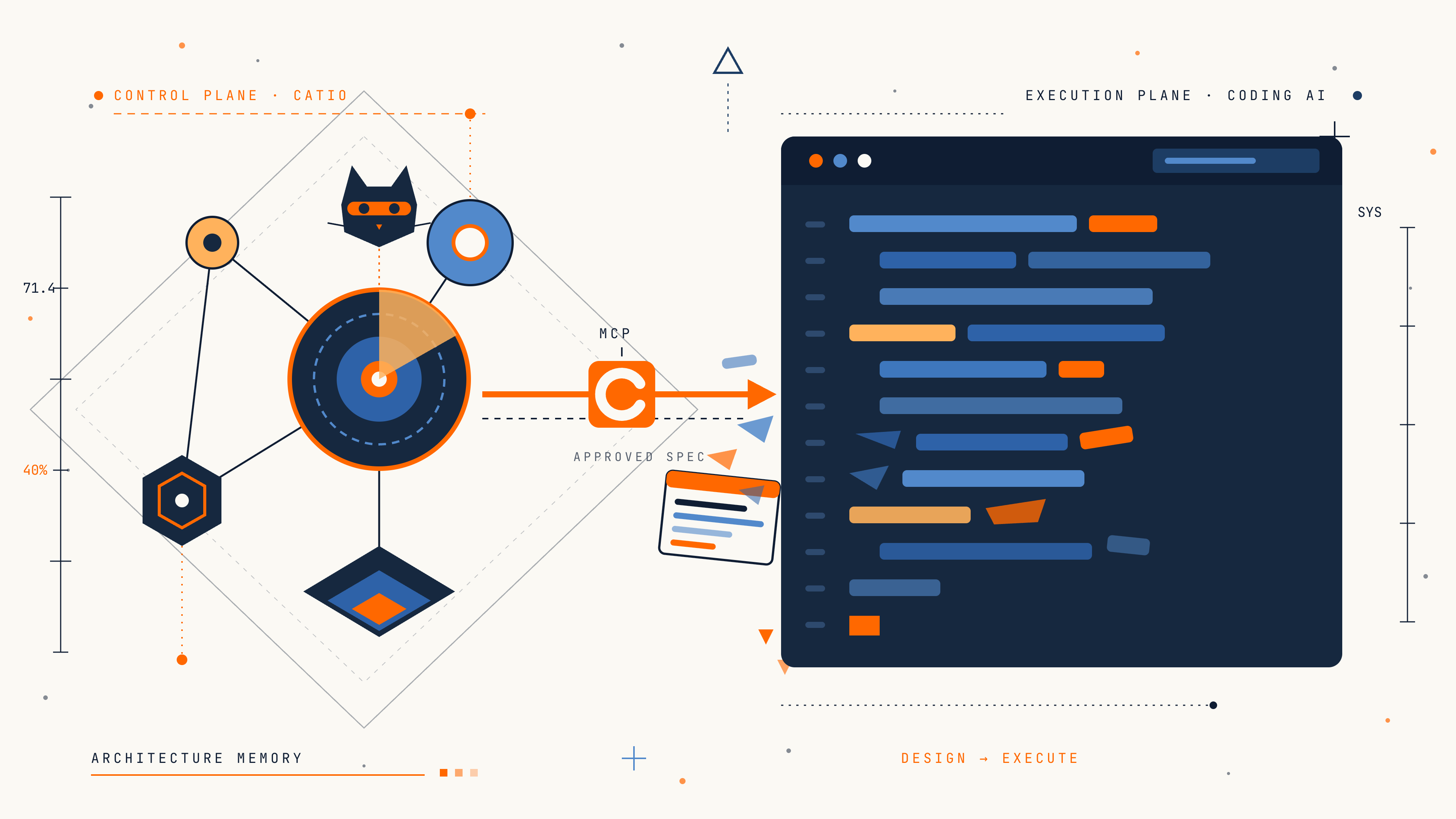
The situation we all recognize
You're staring at a blank file, and your coding agent is ready to help. You ask it something like "redesign our notifications service to be more reliable." It cheerfully writes you a plan. A good plan: well-structured, reasonable choices, confident tone.
And almost none of it applies to your system.
It doesn't know you're on Aurora Postgres, not MySQL. It doesn't know you already have a Redis Streams deployment the team chose for a reason. It doesn't know about the compliance requirement that says notification payloads can't leave the VPC, or the cost constraint that killed the last attempt at this exact project. It doesn't know any of it, because it's never seen your architecture. It's a very smart person who just walked into the building for the first time.
So you paste in context. A diagram here, a Slack thread there, a PRD, three pages of inventory you exported by hand. By the time the agent has enough to be useful, you've done half the architect's job yourself, and the result will still drift the moment the codebase moves on.
This is the gap we kept hearing about at Catio. Teams don't lack smart tools. They lack a way for those tools to see the system they're working on. The research backs up what teams keep telling us: software projects spend about 40 to 50 percent of their effort on avoidable rework, and the stories behind that number are always the same. Drift, specs disconnected from what's running, decisions that happened in a Slack thread nobody can find six months later.
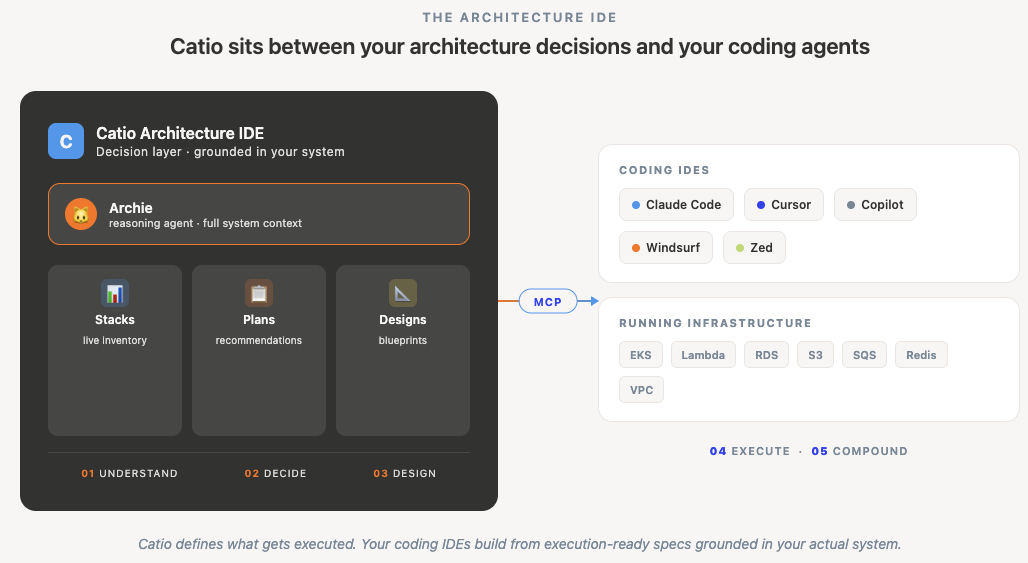
Our thesis at Catio is one line, and it's the one architects keep repeating back to us:
We don't replace coding IDEs. We define what they execute.
You keep building in Cursor, Claude Code, Copilot, VS Code, whatever your team loves. Catio is the layer above those tools: the Architecture IDE that turns a real question about your system into a decision, and a decision into an execution-ready spec your agent can actually build from.
Until recently that loop lived in the Catio console. You'd open a browser, reason with Archie, generate a blueprint, and then, somewhere else, turn it into code. The last mile was manual.
Now we've closed that last mile. Catio now speaks the Model Context Protocol, the same standard your coding assistant already uses to reach tools beyond the editor, so your agent can reach into the Architecture IDE directly. It can ask about your architecture, reason with Archie, generate and refine blueprints, and pull specs, all from inside the editor. The decision layer and the execution layer are finally talking to each other in real time.
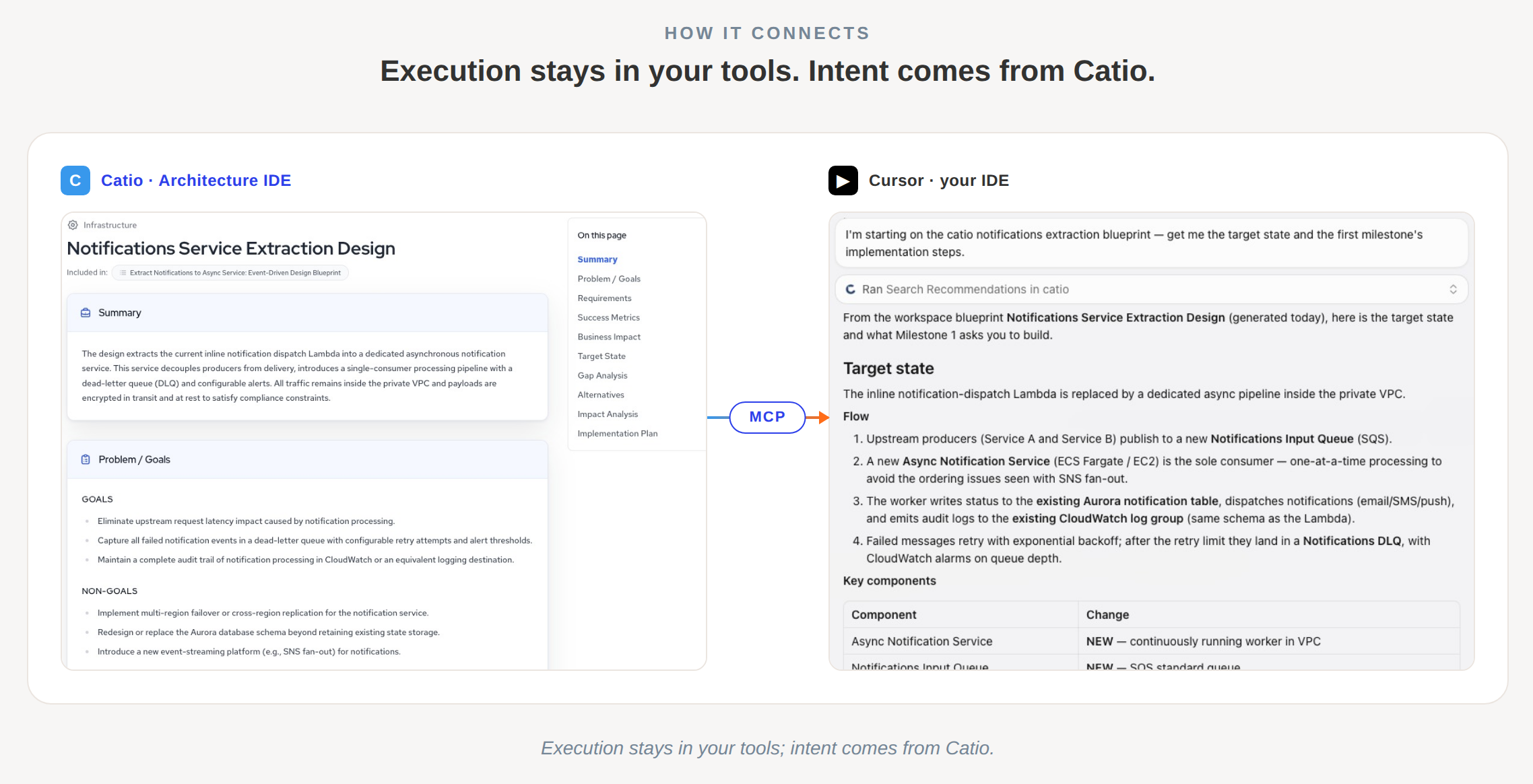
What that actually looks like depends on who you are. So instead of a feature list, here are two mornings.
Morning one: Maya, staff engineer
Maya is a staff engineer at a mid-sized fintech. She splits her time between making architecture calls, leading a couple of developer teams, and still pitching in on code herself, which is why her editor is where she works. She's responsible for a handful of services that have grown organically for three years and are starting to creak. She opens her editor with a question that's been on her mind all week: the notifications service is becoming a bottleneck, and she wants to figure out whether to extract it into its own async service before it becomes an emergency.
She doesn't start by writing code. She starts by asking her assistant to get oriented in plain language:
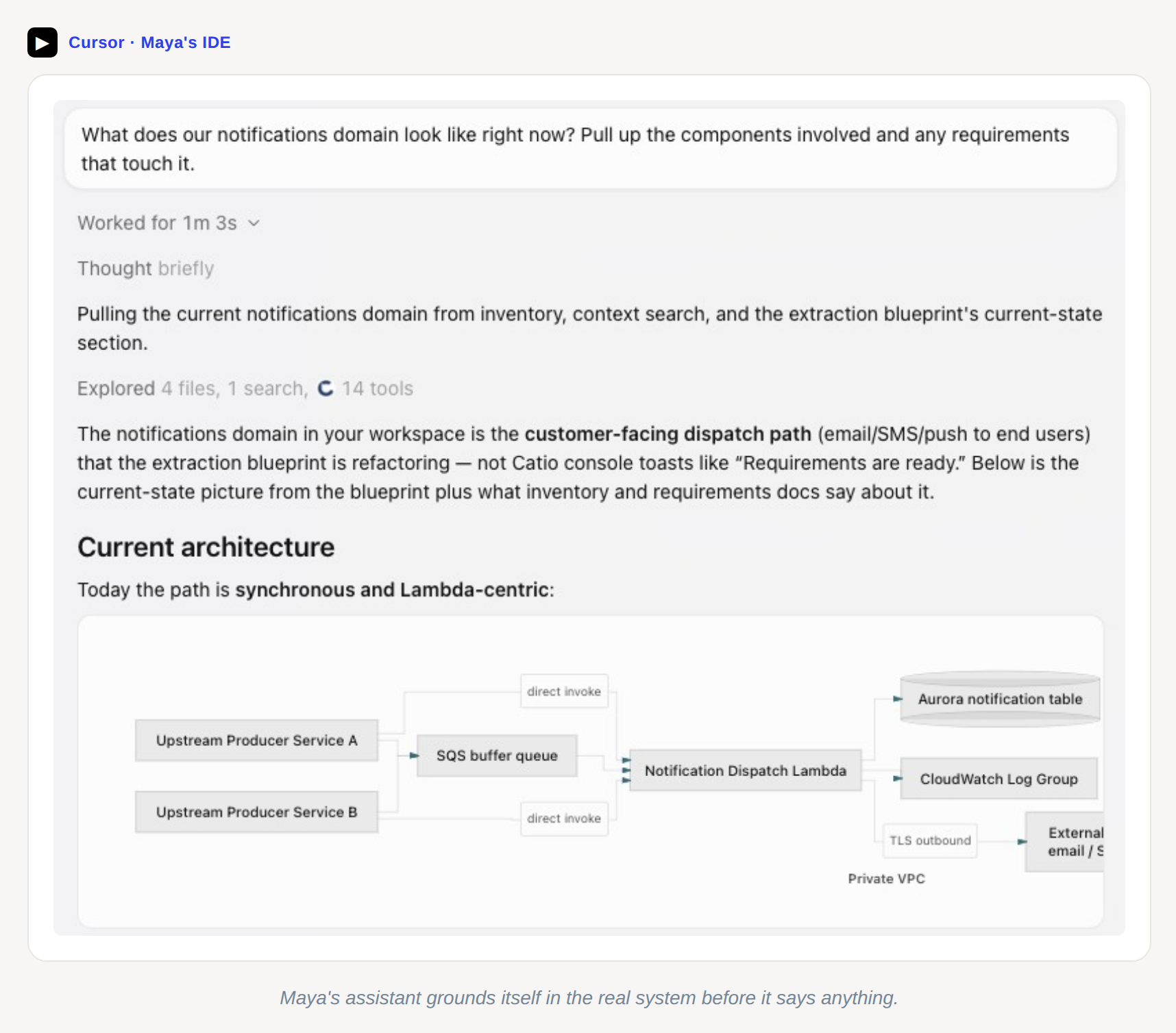
"What does our notifications domain look like right now? Pull up the components involved and any requirements that touch it."
Her assistant reaches into Catio and comes back with the real picture: the Lambda that handles notification dispatch, the Aurora table it writes to, the SQS queue in front of it, the two services that call it, and the three compliance requirements that constrain it. Not a diagram someone drew last year. This is the system as it actually runs today.
She talks to Archie next. Archie is Catio's reasoning agent. Think of it as a principal architect who's read every decision your team has ever made in Catio and has perfect recall. She asks:
"Ask Archie: what are the biggest reliability risks in our notifications setup, and what would it take to extract it into an async service? Give me the trade-offs, not just a recommendation."
Archie comes back with options rather than one answer, the real fork in the road: keep the inline dispatch and harden it, extract to a dedicated async service backed by Redis Streams, or go event-driven with SNS and SQS. Each one priced in effort, risk, and cost. Each one tied to the specific components and requirements Maya's assistant just surfaced. She pushes back on one:
"Ask Archie: the event-driven option looks cleaner but we tried SNS fan-out 18 months ago and it caused ordering issues. Is that captured anywhere, and does it change the recommendation?"
And here's the part that makes Maya actually trust it: Archie knows. That decision from 18 months ago is in Catio's architecture memory. It didn't evaporate into a Slack thread. Archie factors it in and adjusts, telling her the ordering concern was specifically about fan-out to multiple consumers with different latency profiles, and that the async-service option sidesteps it because there's a single consumer.
Maya's not done. She wants a blueprint, an execution-ready spec her teams can build from. She has a PRD a product manager wrote, so:
"Here's the PRD for the notifications extraction. Generate a blueprint from it, grounded in what we just looked at. Show me the outline first before you generate the full thing."
The outline comes back: title, the plan items, the target state at a high level. Maya reviews it, asks for one change (a dead-letter queue for notifications that fail after retries), and tells the assistant to accept it and generate the full blueprint. A couple of minutes later she has the complete spec: target state, gap analysis, impact analysis, implementation plan with milestones, cost breakdown, risks, success metrics. Grounded in her components. Aligned to her requirements. The compliance constraint about payloads not leaving the VPC is right there in the guardrails, because Archie saw it.
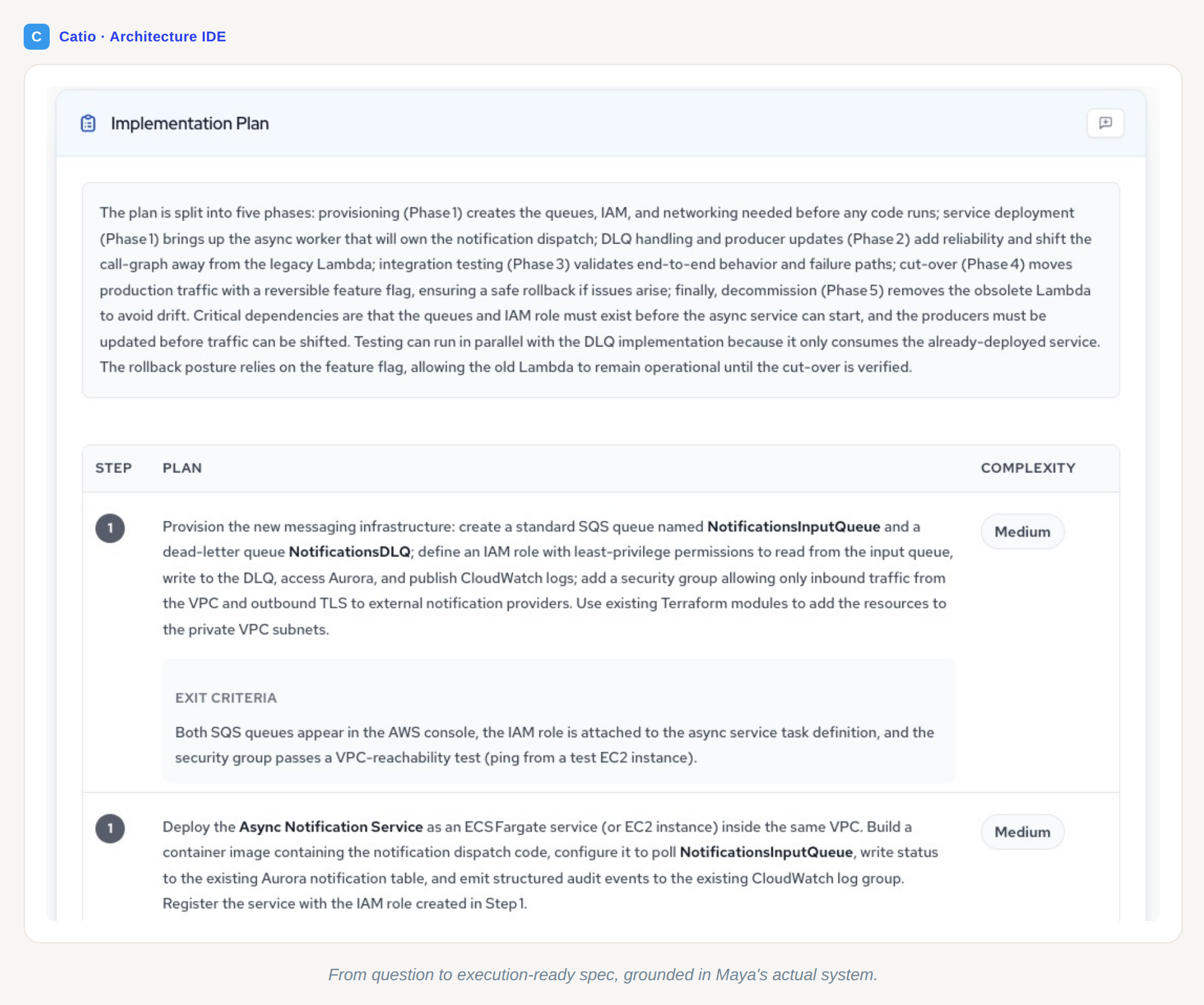
She posts the blueprint link in the team channel and moves on to the next thing. She didn't write a single line of code. She made a decision, a good one, in a single sitting, and it's now persisted as architecture memory for the next person.
That's the staff engineer's morning: reason, decide, define. The coding assistant was her interface to Catio the whole time, but what she got was a decision she could commit to, not a code suggestion.
Morning two: Sam, the developer who inherits Maya's blueprint
Sam picks up the blueprint the next day. He's a senior engineer on the notifications team, but he wasn't in the room when Maya and Archie reasoned through the trade-offs. In the old world, he'd get a link to a doc, read it, have questions, ping Maya on Slack, wait, and start coding with a partial understanding.
Now his editor already knows.
"I'm starting on the notifications extraction blueprint Maya posted yesterday. Get me up to speed. What's the target state, what components am I touching, and what requirements do I need to respect?"
His assistant pulls the blueprint and the live inventory together. Sam sees the target architecture, the specific components he's modifying, the dependencies that'll shift, and the compliance and cost constraints baked into the spec. He's oriented in seconds instead of a morning of catch-up.
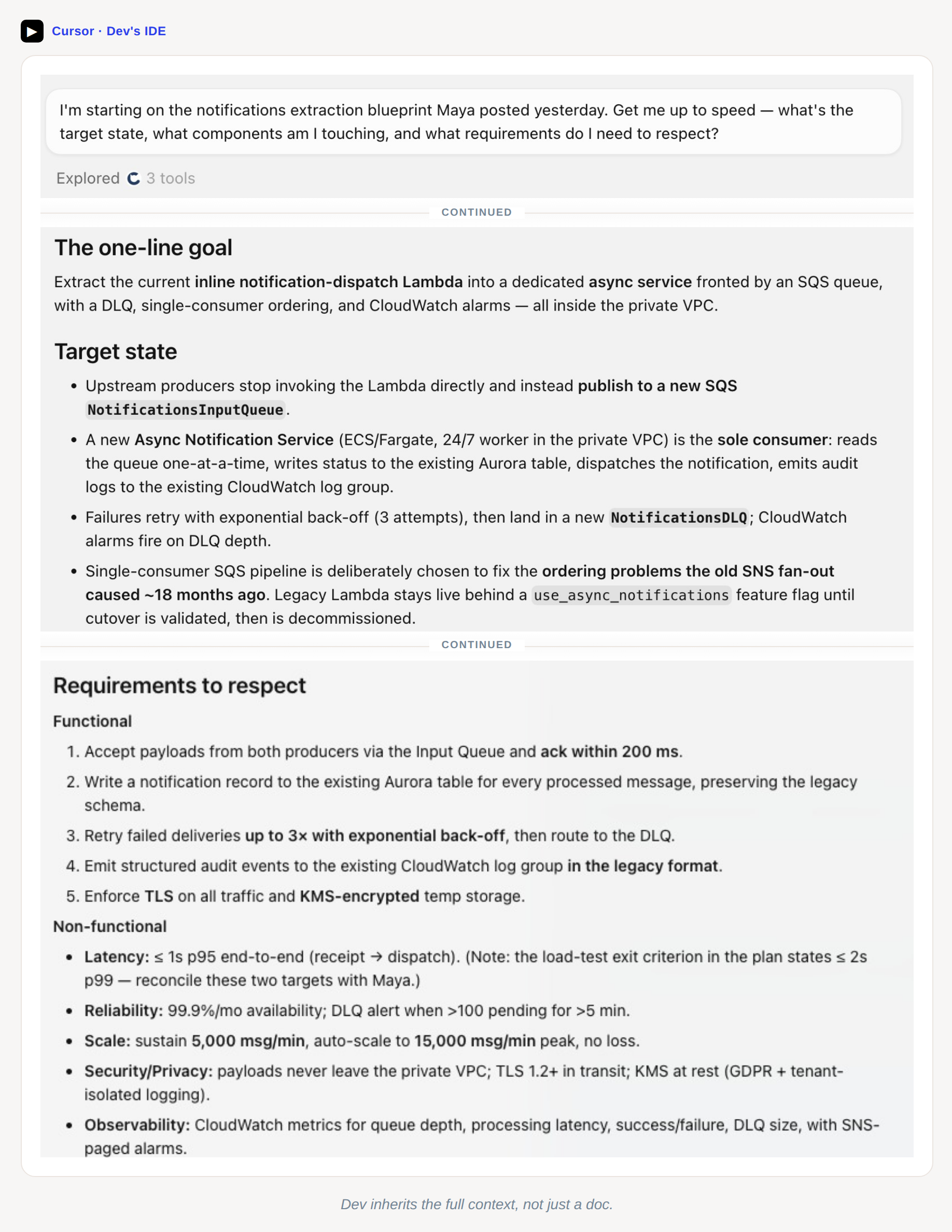
He starts implementing the first milestone. Halfway through, he realizes something the blueprint didn't fully account for: the existing Lambda has a retry path that writes to a CloudWatch log group the team uses for audit, and the new design routes failures to a dead-letter queue instead. He's not sure if that loses the audit trail. Rather than guess or block on Maya, he asks:
"Ask Archie: in the notifications extraction blueprint, moving failures to a DLQ. Does that drop the audit trail we currently get from the Lambda's CloudWatch retry logs? If so, how should we preserve it?"
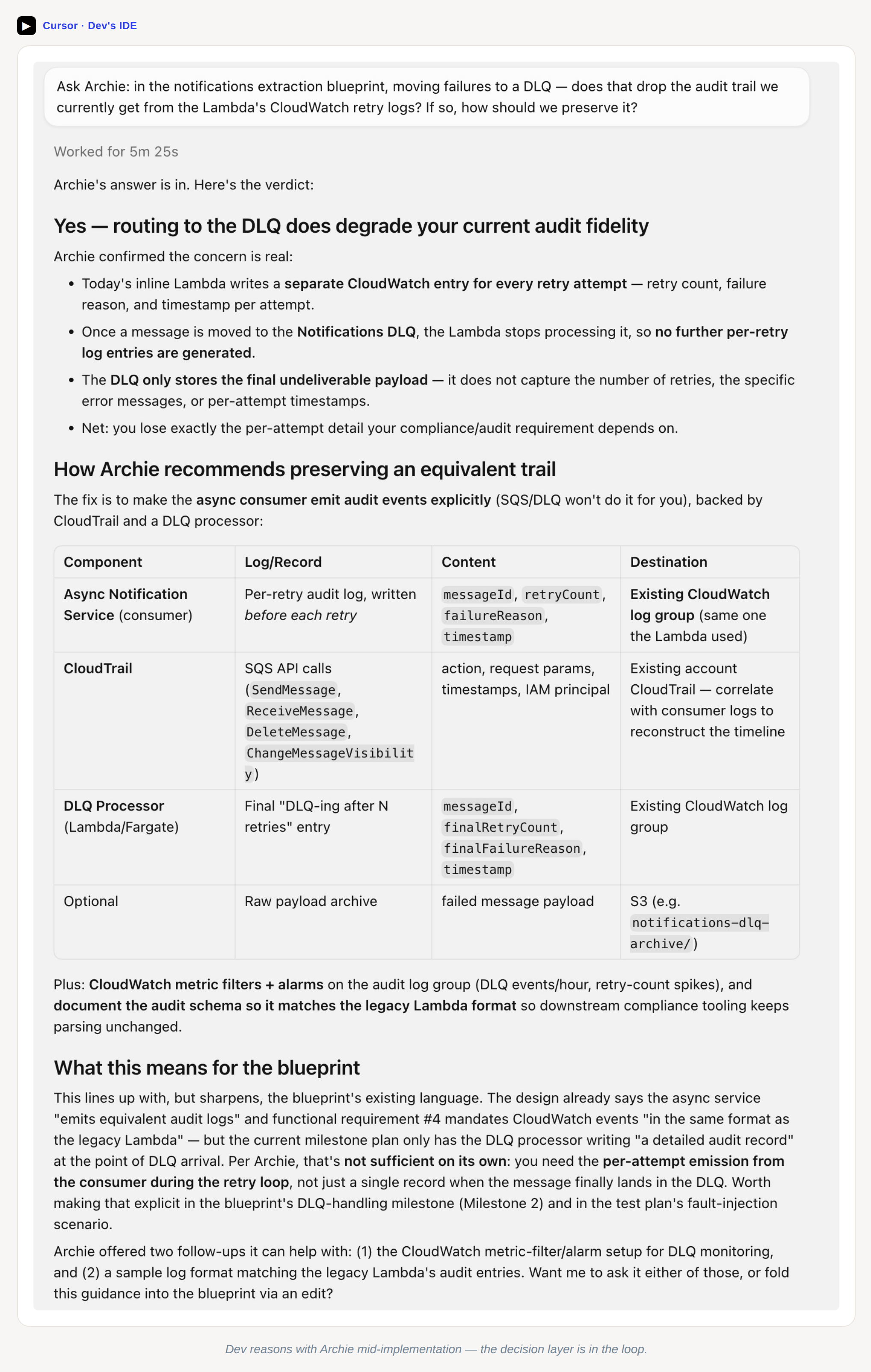
Archie reasons about it, with the blueprint and the components in context, and comes back with a clear answer: yes, routing failures to the DLQ drops the per-retry audit trail. Today's inline Lambda writes a separate CloudWatch entry for every retry attempt (retry count, failure reason, timestamp), and once a message moves to the DLQ the Lambda stops processing it, so those per-attempt entries stop. The DLQ only holds the final undeliverable payload, not the retry history the compliance requirement depends on.
The fix Archie proposes: have the new async consumer emit a per-retry audit event to the same CloudWatch log group, in the same schema as the legacy Lambda's retry logs, so the trail is reconstructed by the consumer instead of lost, plus a final record when a message actually lands in the DLQ. It's a small, blueprint-consistent delta. Fold it into the DLQ-handling milestone and the fault-injection test. Sam adjusts his implementation, notes it, and keeps going.
This is the moment worth pausing on. Sam didn't have to wait on Maya, and he didn't have to guess and find out in review. He got a grounded answer in seconds, from a reasoning agent that knew the blueprint, knew the system, and knew the constraints. The decision layer was in the loop while he was typing.
Later that week, Sam ships the first milestone and starts on the second. But the team's learned something from the first sprint: the DLQ should have an alarm when it climbs above a threshold, and the monitoring section of the blueprint doesn't cover it. In the old world this is where the blueprint starts to drift from reality. Someone adds the alarm in code, nobody updates the doc, and six months later nobody remembers why the alarm is there.
Sam doesn't let it drift. He asks his assistant to update the blueprint itself:
"Edit the notifications extraction blueprint: add a DLQ alarm to the monitoring section. Show me the change before you save it."
Archie refines the blueprint and hands back the edited monitoring section, structured data rather than prose. Sam reviews it, it looks right, and he tells the assistant to persist it. The blueprint is now the source of truth again, not a stale artifact. The decision is architecture memory. The next person who looks at this service, whether that's an engineer, an architect, or an auditor, sees the full story.
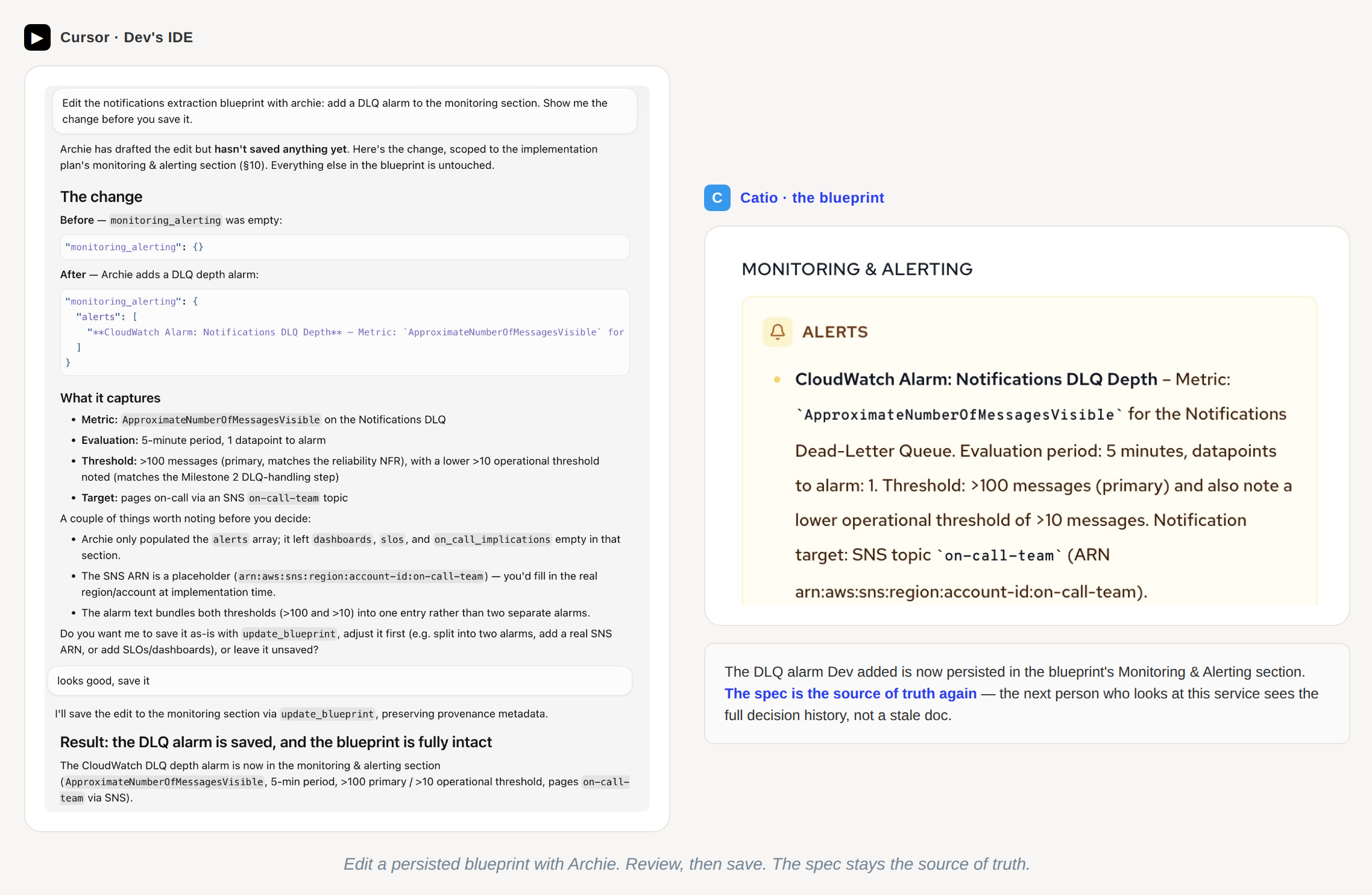
That's the developer's morning: understand, build, keep it aligned. Sam was fast. He always is. But he was fast and grounded, and the spec didn't drift when reality did.
What changed, in one sentence
Your coding agent goes from building on assumptions to building from decisions made with your actual system in view, and those decisions stick.
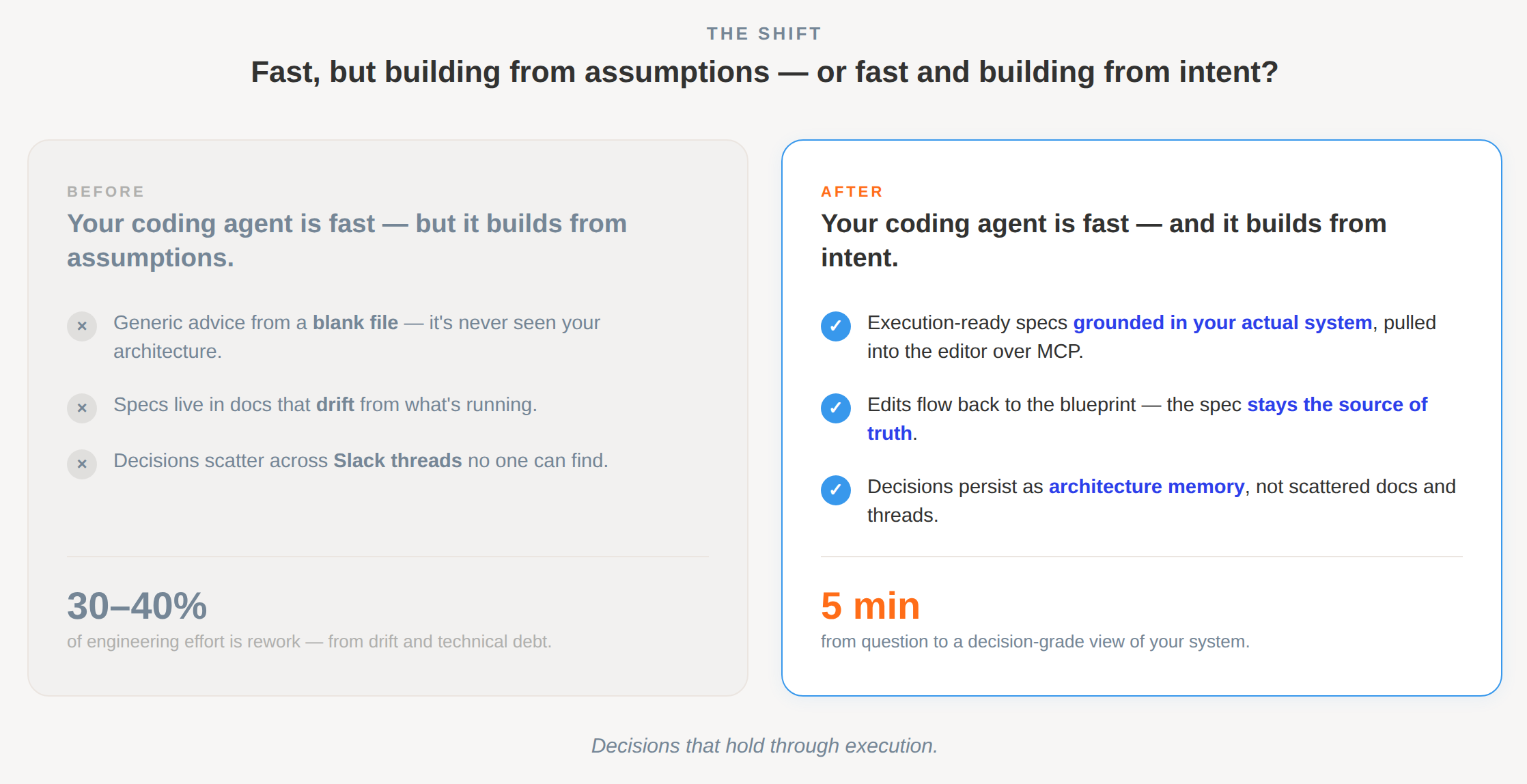
Before: your coding agent is fast, but it builds from assumptions. Generic advice, stale docs, whatever you paste in. The system drifts, and rework eats a third or more of your effort.
After: your coding agent is fast and builds from intent. Execution-ready specs grounded in your actual system, with decisions that persist as context. The system compounds.
That's the whole promise. The engineer making the architecture call reasons and decides with full system context. The engineer building from that decision doesn't lose the context that made it right. And every decision along the way stays as architecture memory: the trade-off Archie evaluated, the PRD the blueprint came from, the edit Sam made when reality changed. None of it evaporates into a doc nobody updates or a thread nobody can find.
The MCP server is what makes it real inside the tools you already use. We don't replace your coding IDE. We give it a clue about your architecture.
Try it
If you're already a Catio customer, point your coding assistant at Catio and you're off. The endpoint, the client setup, and the troubleshooting guide are all in our docs. Works with Claude Code, Cursor, VS Code with Copilot, Windsurf, Zed, Claude Desktop, OpenCode, and anything else that speaks MCP over Streamable HTTP. The first time you connect, your client opens a browser window to authenticate and pick the organization and workspace the assistant can work in; after that, your session refreshes on its own. And as with Maya's outline and Sam's blueprint edit, you can have every change shown to you before it's persisted.
- MCP endpoint:
https://mcp.catio.tech/mcp - Setup: docs.catio.tech/docs/setup
- Troubleshooting: docs.catio.tech/docs/troubleshooting
- Brochures and Demos: 1-Pager, Adoption Walkthrough Brochure, Demo Video
If you're not a Catio customer yet, start a real architecture decision. You'll be generating grounded blueprints from your editor before lunch.
Share this Post