August 8, 2026
Web Application Architecture: Layers, Types & Best Practices

Every web application you've ever used, from a banking dashboard to a food delivery app, runs on some version of the same underlying structure. Web application architecture is the term for that structure: the arrangement of frontend, backend, and data layers that determines how the app actually behaves under load, under change, and under new hands. Get it right, and the app scales quietly in the background. Get it wrong, and every new feature feels like surgery on a patient who won't stop moving.
This guide covers the layers, components, and major patterns behind modern web application architecture, plus the practical question every team eventually has to answer: how do you choose the right one, and keep it right as the system changes?
What Is Web Application Architecture?
Web application architecture is the structural framework that defines how the client-side (frontend), server-side (backend), and databases interact to deliver a functional application over the internet. It's the blueprint that determines how a user's click in a browser turns into a database query, a computed response, and a rendered page, and it governs how those pieces stay reliable as more users, more data, and more code get added over time.
That framework isn't one diagram. It's a set of decisions: which layer owns which responsibility, how components talk to each other, where state lives, and what happens when one piece fails. Those decisions compound. A system architecture sits one level above this, covering the full technical estate (infrastructure, integrations, data platforms) that a web application is just one part of. Web application architecture is the zoomed-in view: the specific arrangement of application logic, presentation layer, and data access that makes one product work.
How Web Application Architecture Differs from a Website
A simple static website primarily serves the same content to every visitor, though in practice many websites also carry dynamic elements: contact forms, a CMS-backed blog, personalization, or analytics scripts, so the line is more of a spectrum than a hard rule. A web application, by contrast, adds application logic, state, permissions, or user-specific workflows on top of that content. The distinction matters architecturally because a mostly static site can often be served by a CDN and a handful of static files, while a web application needs application logic running somewhere, a way to store and retrieve user-specific data, and a defined path for requests to reach that logic. The moment a "page" needs to remember who you are or compute something in response to what you did, you've crossed further into web application territory, and the architecture has to account for it.
Why Web Application Architecture Matters
Three things break first when architecture is an afterthought: reliability, scalability, and security. Reliability suffers because tightly coupled components fail together. Scalability suffers because a design that works at 500 users doesn't automatically work at 50,000. And security suffers because access control and input validation get bolted onto layers that were never designed to enforce them.
None of these show up on day one; they show up eighteen months in, when the team that built the original system has moved on, and the people maintaining it are reverse-engineering decisions nobody wrote down. Good web application architecture doesn't just make the app work today; it also makes the app legible to whoever has to change it next.
How Web Application Architecture Works (The Request-Response Flow)
Every interaction with a web application follows a version of the same sequence, whether it's a single click or a form submission. Here's what happens between the moment a user acts and the moment they see a result:
1. The browser needs an IP address. DNS resolves the domain name in the URL to an IP address, though in many modern deployments that address points to a CDN, edge proxy, load balancer, Anycast address, or API gateway rather than a single origin server. As Cloudflare's DNS documentation puts it, "DNS translates domain names to IP addresses so browsers can load Internet resources."
2. The browser sends an HTTP request. This travels to the resolved server, carrying a method (such as GET, POST, PUT, DELETE, PATCH, or OPTIONS), headers, and often a body. MDN's HTTP overview describes HTTP as "a client-server protocol, which means requests are initiated by the recipient, usually the Web browser."
3. A load balancer, if one exists, routes the request. In any system running more than a single server, the load balancer decides which server instance handles this particular request, distributing traffic so no single machine gets overwhelmed.
4. The server-side application processes the request. This is where application logic lives: authentication checks, business rules, and any computation the request requires.
5. The server queries the database (if needed). Data gets read, written, or updated, often passing through a caching layer first to avoid hitting the database for information that hasn't changed.
6. The server sends back an HTTP response. This includes a status code (200, 404, 500, and so on), headers, and typically a JSON or HTML payload.
7. The browser renders the response. Client-side code parses the data and updates what the user sees, sometimes reloading the full page, sometimes updating a fragment of it without a reload.
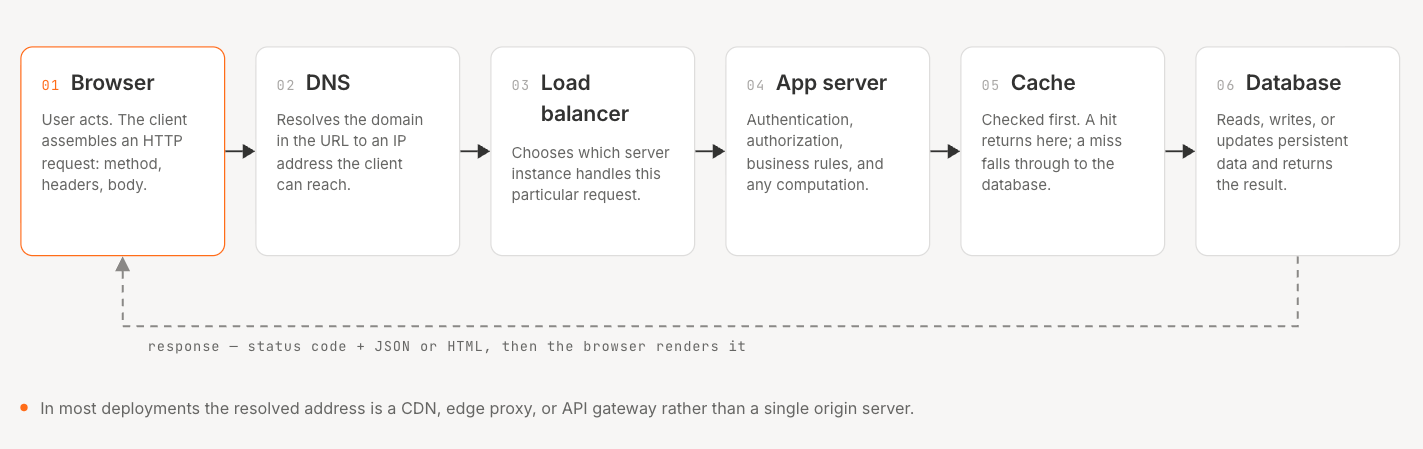
The diagram above groups these seven steps into the six major stops a request makes; the underlying sequence is the same. This request-response flow is the mechanism underneath the three-tier model covered in the next section: presentation, business logic, and data access. And to the common question of "which architecture is most commonly used for web applications": client-server architecture, structured across three or more tiers, is a common default starting point for production web applications, even when microservices or serverless patterns get layered on top of it later.
Client-Side vs. Server-Side Code
Client-side code runs in the user's browser: HTML, CSS, and JavaScript that render the interface and handle immediate interactions like form validation or animations. Server-side code runs on infrastructure the user never sees: the application logic that enforces business rules, talks to the database, and decides what data the client is allowed to have.
The split matters for a practical reason. Anything that runs client-side is visible and editable by anyone with browser dev tools open, so client-side code should never be the only thing enforcing a security rule or a business constraint. Client-side validation improves user experience (instant feedback on a malformed email address); server-side validation is what actually protects the system. Teams that skip server-side enforcement because "the frontend already checks for that" are a recurring source of the kind of security gap OWASP's SQL injection and cross-site scripting advisories describe: attacks that work specifically because a server trusted input it shouldn't have. Validation isn't the whole job: server-side authorization matters just as much, since the server must independently enforce identity, permissions, and data access. Hiding a control on the client doesn't stop someone from calling the underlying request directly.
Core Components of Web Application Architecture
A production web application is rarely just "frontend talks to backend talks to database." The eight components below are common, recurring pieces of the request path, though not every application needs all of them, and larger systems often add more, such as API gateways, object storage, message brokers, web application firewalls, identity providers, observability tooling, and secrets management.
- DNS: resolves the domain name to a server IP address, the first step in every request.
- Load balancer: distributes incoming traffic across multiple targets so no single server becomes a bottleneck or a single point of failure.
- Web application servers: run the application logic: the code that processes requests, applies business rules, and generates responses.
- Database: stores and retrieves persistent data, whether relational (structured, transactional) or non-relational (flexible schema, high write throughput).
- Caching service: holds frequently requested data in fast-access memory so the application doesn't re-fetch or re-compute the same thing on every request. MDN's caching documentation notes that "the HTTP cache stores a response associated with a request and reuses the stored response for subsequent requests."
- Job queue: handles work that shouldn't block the main request-response cycle, like sending an email or processing an uploaded file asynchronously.
- Full-text search service: powers search functionality that a standard database query isn't built to handle efficiently at scale.
- CDN: caches content close to end users geographically, cutting latency for static assets like images, scripts, and stylesheets.
Middleware systems sit between these components, handling cross-cutting concerns like authentication, logging, and rate limiting so that individual services don't have to reimplement them. Application logic, the actual business rules that make the product do what it's supposed to do, typically lives in the web application server layer, though in more distributed systems it can be spread across multiple services that communicate over an API.
This component list is also where the gap between "architecture as documented" and "architecture as deployed" tends to open up. A diagram drawn during initial design shows these eight components cleanly separated. Eighteen months later, after three teams have shipped features under deadline pressure, the caching layer might be inconsistently applied, the job queue might have a service reading from it that nobody remembers adding, and the diagram is now describing a system that doesn't exist anymore. That's the gap between an architecture diagram and what's actually running, and it's less a documentation problem than an ongoing-maintenance problem: static diagrams describe a moment, not a system in motion.
The 3-Tier / Multi-Tier Architecture Model
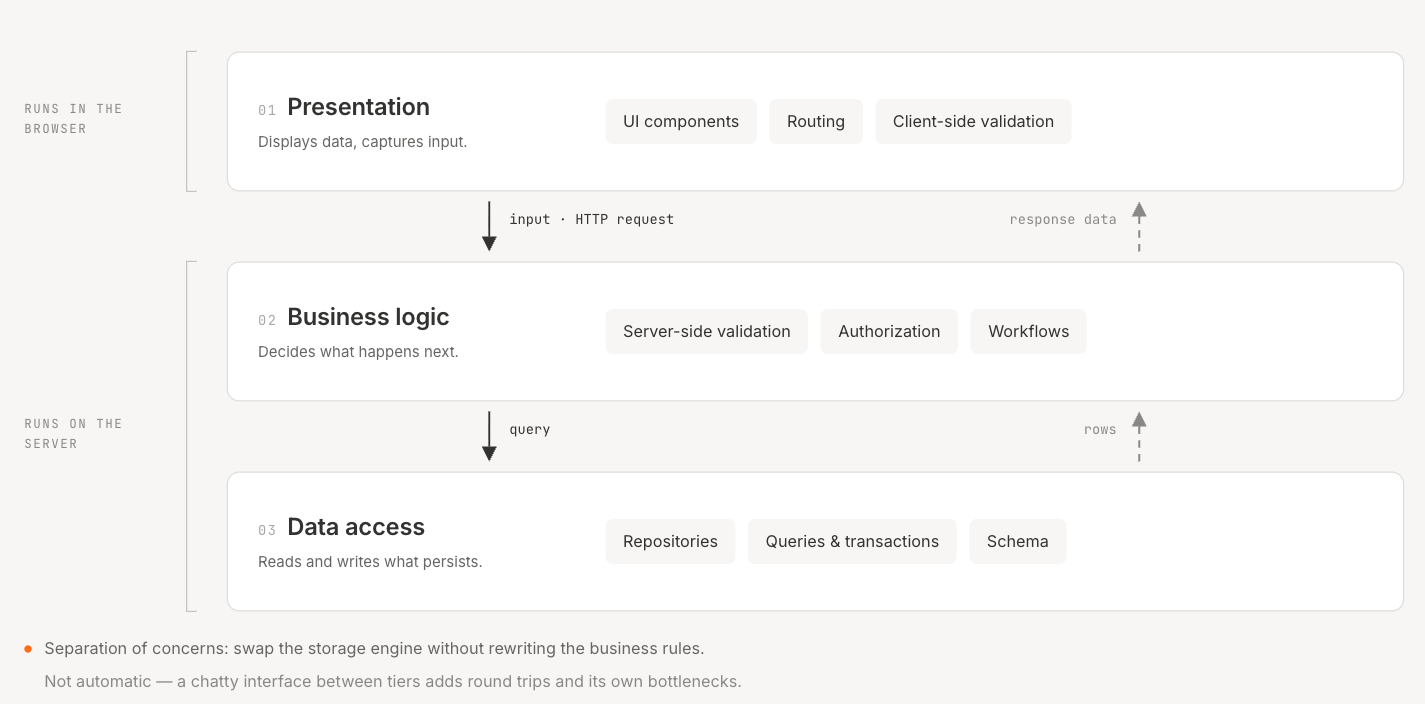
The three types of web architecture that show up in almost every serious discussion of the topic map to three tiers, each with a distinct job:
1. Presentation layer: what the user sees and interacts with: the UI, rendered in the browser or a native client, responsible for displaying data and capturing input.
2. Business logic layer (sometimes called the application layer): the rules and processes that act on that input: validation, calculations, workflows, and decisions about what happens next.
3. Data access layer: the layer responsible for reading and writing persistent data, typically a database, abstracted behind an interface so the business logic doesn't need to know the specific storage technology underneath it.
Layered architecture like this exists mainly for one reason: separation of concerns. When the presentation layer only presents, the business logic layer only decides, and the data layer only persists, each layer can change independently. A team can redesign the UI without touching the database schema, or swap a relational database for a different storage engine without rewriting the business rules. AWS's overview of distributed computing describes this pattern: application servers and database servers are split "into two categories. By dividing server responsibility, three-tier distributed systems reduce communication bottlenecks." That benefit isn't automatic, though: a poorly designed three-tier system can just as easily add network hops and bottlenecks between layers, especially when a chatty interface forces repeated round trips.
The trade-off is added complexity. A tightly coupled, single-layer application is faster to build for a small, simple project. A properly tiered application takes more upfront design work, but it's what makes a system maintainable once more than one person is working on it, or once the app has to survive past its first version.
Types of Web Application Architecture
Once you're past the tier model, the next question is how the application is actually deployed and structured at a system level. Three patterns dominate current production systems, and most real applications are some combination of the three rather than a pure implementation of just one.
Single-Page Applications (SPA)
A single-page application loads one HTML document and then updates the page dynamically using JavaScript, without full-page reloads on every navigation. MDN's glossary defines an SPA as a web app implementation that "loads only a single web document, and then updates the body content of that single document via JavaScript APIs." The server typically returns data (often JSON) rather than fully rendered HTML, and the browser handles rendering and routing on the client side.
SPAs feel fast because navigation within the app doesn't require a full round trip to the server for every screen. The trade-off is a heavier initial load (the browser downloads more JavaScript upfront) and more client-side complexity, since state management, routing, and rendering logic all move into the browser. In practice, SPA versus server-rendered isn't a clean binary anymore: many modern frameworks blend client-side navigation with server-side rendering, static generation, and hydration for faster initial loads, better SEO, and better accessibility.
Microservices Architecture
Microservices break an application into a set of small, independently deployable services, each responsible for one piece of business functionality and communicating over the network, usually via HTTP APIs. Martin Fowler and James Lewis's widely cited definition describes this as "an approach to developing a single application as a suite of small services, each running in its own process and communicating with lightweight mechanisms, often an HTTP resource API."
The appeal is independent deployability: a team can update the payments service without redeploying the entire application. The cost is operational complexity. More services means more network calls, more places for failures to originate, and a harder question of how services stay consistent with each other over time. Teams considering moving from a monolith to microservices are usually trading development-time simplicity for deployment-time flexibility, and it's rarely worth it below a certain scale of team and system. For teams that do make the move, there's a real difference between adopting the pattern and adopting it well, and that gap is usually about discipline: clear service boundaries, ownership, and monitoring, the kind of detail covered in our microservices best practices guide, rather than tooling alone.
Serverless Architecture
Serverless architecture runs application code without the team managing the underlying servers. In AWS's words, serverless means you can "build and run applications without thinking about servers." Code runs in response to events (an HTTP request, a file upload, a scheduled trigger), and the cloud provider handles provisioning, scaling, and patching. That coverage stops at the infrastructure layer, though: the team still owns application-level reliability and security, including observability, IAM configuration, deployment pipelines, service quotas, event retry logic, and cost controls.
The economics are often the draw: for many FaaS workloads, you pay for execution time rather than for servers sitting idle, though provisioned concurrency or reserved capacity can change that calculation for latency-sensitive services. The trade-off is less control over the runtime environment and, for some workloads, cold-start latency when a function hasn't run recently.
Legacy vs. Modern Web Application Architecture
"Legacy" and "modern" aren't just a matter of age. A five-year-old system built with clear service boundaries and automated deployment can be more modern, in the ways that matter, than a system built last quarter with none of those things. The table below describes common patterns, not fixed definitions: plenty of legacy systems are modular, and plenty of newer systems are still single-stack monoliths that deploy rarely and work fine for their scale.
The harder truth underneath this table is that "modern" architecture doesn't stay modern on its own. CI/CD and containerization solve the deployment half of the problem. They don't solve the decision half: knowing when a service boundary has stopped making sense, when technical debt has crossed from manageable to structural, or when three teams have each independently made a reasonable local decision that adds up to an inconsistent system.
That's the part most teams handle with quarterly reviews and institutional memory, which works until the person who remembers why a decision was made leaves. This is the specific problem we built Catio around. Rather than treating architecture as something drawn once in a diagramming tool and left to go stale, we function as a continuous system for managing architecture decisions. We're grounded in what's actually running across our connected systems and integrations, not just what's documented, though a live model can still miss unconnected systems, shadow integrations, manually configured cloud resources, or undocumented third-party flows. Archie, our reasoning agent, surfaces recommendations with explicit trade-offs, risk, and ROI drawn from the live system rather than a generic pros-and-cons list.
When a team asks whether a service should be split, or whether a legacy component still justifies its maintenance cost, the answer comes with context about what that decision touches elsewhere in the system, not just an isolated opinion. That includes what happens after the decision: drift detection and architectural memory intended to catch a system quietly diverging from its intended design before that gap becomes the reason for a rewrite.
How to Choose the Right Web Application Architecture for Your Product
There's no universally correct architecture, only the right fit for a specific set of constraints. Two teams building similar products can land on very different, equally correct answers depending on their situation.
Key Decision Factors
- Complexity of the domain. A simple CRUD application doesn't need microservices. A system with clearly distinct business domains (billing, fulfillment, notifications) may benefit from separating them.
- Expected traffic and scaling needs. An internal tool for 50 employees has different scalability requirements than a consumer app expecting viral growth.
- Team size and expertise. Microservices multiply operational overhead. A five-person team is usually better served by a well-organized monolith than by ten services they don't have the staff to operate.
- Budget. Serverless can be cheaper at low, spiky traffic and more expensive at sustained high volume. Run the math before committing.
- Compliance requirements. Regulated industries (financial services, healthcare, insurance) often need architecture decisions that are auditable and explainable, which pushes toward clearer service boundaries and more deliberate data handling, not necessarily more complexity for its own sake.
Scalable web application architecture generally means the system can absorb more load, more data, or more features without a full rebuild, and that's a design property, not an accident. It comes from decisions made early: how tightly components are coupled, how state is managed, and how much of the system can scale independently.
Common Best Practices
- Cache aggressively, but deliberately. Cache what's expensive to compute and slow to change; don't cache what needs to be fresh on every request.
- Design API-first. Define the contract between client and server (or between services) before building either side, so teams can work in parallel. That contract only stays stable if it's versioned, covered by contract tests, and changed with backward compatibility in mind.
- Build in observability from the start. Logging, metrics, and tracing are far easier to add during initial design than to retrofit onto a system already in production.
- Automate CI/CD. Manual deployment doesn't just slow releases down; it increases the odds of a mistake happening at the worst possible time.
- Plan for failure, not just success. Assume a downstream service will be slow or unavailable at some point, and design timeouts, retries, and fallbacks accordingly.
Conclusion: Architecture Decisions Compound
The layers, components, and patterns covered here (presentation, business logic, and data tiers; SPAs, microservices, and serverless; the request-response flow that ties it all together) give you enough to have an informed conversation about which architecture fits a given product. That's the foundation, but it's not the hardest part of the job.
The harder part is what happens after the diagram is drawn: the system keeps changing, teams keep shipping, and the gap between documented architecture and actual architecture starts to widen the day after launch. Architecture decisions made early- monolith or microservices, SPA or server-rendered- compound in cost and risk over time, whether or not anyone is tracking that compounding on purpose.
That's the problem we built Catio to solve. Coding tools like Cursor, Claude Code, and GitHub Copilot execute a decision once it's made. We exist for the layer above that: deciding what should be built, keeping that decision grounded in our continuous system for managing architecture decisions rather than a document that goes stale, and making sure the next decision accounts for the ones already made. If you're evaluating how your own system's architecture has drifted from what's documented, that's a reasonable place to start looking.
FAQ
What are the 4 layers of an API? There's no single standardized "4 layers of API" model, and the answer varies depending on the source. The most common version splits a request's path into four layers: presentation (what the user interacts with), application/business logic (which processes the request and applies rules), data access (which reads and writes to storage), and transport/network mechanics (DNS resolution and the HTTP request-response cycle that carries the request between the other three). In practice, this maps onto the same three-tier model covered above, with the request-response mechanics called out as a distinct concern.
What are the three types of web architecture? The three most commonly referenced types are single-page applications (SPA), microservices architecture, and serverless architecture. Some frameworks also include service-oriented architecture (SOA) as a fourth pattern, particularly in enterprise contexts that predate the microservices era.
Which architecture is most commonly used for web applications? Client-server architecture, typically structured across a three-tier model (presentation, business logic, data), is a common default starting point for production web applications, even when microservices or serverless patterns are added on top of it.
What is the difference between an API and a web app? A web application is the full product a user interacts with, including its interface, logic, and data. An API is a defined interface that lets software components, including a web application's own frontend and backend, or entirely separate systems, exchange data and requests. A web app typically uses one or more APIs internally and may also expose an API for other systems to use.
Share this Post